Showing posts with label software. Show all posts

Tuesday, June 21, 2011

Ruh-roh!

Not so fast...

Upon checking the new Final Cut Pro X camera compatibility page, it looks as if neither of the cameras I have at work (a 60D and a new XA-10) that I would shoot video on are supported (yet.) I say yet because I'me sure that support is coming, but Canon isn't exactly known for its speedy driver updates.

Dangit! Looks like I won't be a Day One Adopter, after all.


I Wet Myself This Morning


Final Cut Pro X is now available for download in the Mac Apps Store. I've been looking forward to this day ever since April. Longer, actually, but in earnest since April.

Happy Tuesday to me!

Thursday, April 14, 2011

Final Cut Pro X - or - How I'm Going to Spend $300 in June

I can't remember the last time I was this excited about a software release. I have got to have this piece of software. I literally laughed out loud with joy at the color correction tool segment at about 15:36 in the second video.


After watching this video yesterday, editing with the current version of Final Cut this morning was somewhat of a disappointment, especially when I had a couple of sync issues and needed to do some quick trial fades on the fly. And the ability to mix types of video with resolution independence is going to be amazing. I've been doing a mix of 720p and DV for awhile now with disappointing results and looooooong render times. Background rendering is going to be much appreciated.

There may be a learning curve, but whatever it is, I'm sure it will be worth it.

Wednesday, January 19, 2011

Wednesday, May 26, 2010

Polar Clock for Snow Leopard


Up until OS X Leopard, my favorite utility of all time was Pixel Breaker's Polar Clock. But the Leopard upgrade broke it and so I've gone a couple of years now without it.

But on a whim, I checked the Pixel Breaker website this morning and found.... drumroll... Polar Clock for Snow Leopard!!!!!

It's a free screen saver available for download, and I absolutely love it.

And there's even an iPhone version now, too. And yes, there's a Windows version too (but something so beautiful just doesn't belong on a crappy old PC.)

Thanks, Pixel Breaker.

Thursday, April 1, 2010

Friday, March 5, 2010

Apple Removes Wi-Fi Scanner Apps from the App Store

From AppleInsider:

Apple this week continued its crackdown against what it feels are substandard applications in its App Store for the iPhone and iPod touch, this time removing Wi-Fi scanners and software it said has "minimum user functionality."

According to the development studio Three Jacks Software, Apple removed its application, called "WiFi-Where," due to its alleged use of unpublished APIs within the iPhone OS software development kit. The developer noted that other applications, including WifiTrak, WiFiFoFum, yFy Network Finder, WiFi Get, eWifi, and WiFi Analyzer were also removed.


I use WifiTrack frequently when I'm out and about to quickly locate a wifi hotspot and the strongest signal. It's a much better way to search for a wifi signal than the cumbersome method of going to settings, clicking wifi and then waiting for the list to repopulate. And there's no indication in the settings network chooser of hidden networks whose ssid isn't published.

WTF, Apple?

Thursday, January 21, 2010

New Genius Mix


I haven't looked at my Genius Mixes in awhile in iTunes, but this morning when I did I saw a new one: Honky Tonk & Outlaw Mix.

Hell, yeah.

Thursday, January 7, 2010

You, too, can make your text look straight out of 1995!

Holy crap! Typestyler still exists!!! And to make matters worse, they've just released an update for it.

At my job in college, the "graphic artists" and secretaries that worked in our office would use Typestyler religiously to create all sorts of craptastic type effects for things such as fliers, posters, letterhead, logos, web sites and, once, even a business card.

I never liked it because even back then I thought that using cheap parlor effects in design looked cheesy. It's also why I never got into Kai's Power Tools.

The fact that it exists into the 21st Century means that there is something really, really wrong with the space/time continuum.

Damn that Marty McFly.

Wednesday, January 6, 2010

What Will the MacSlate Be?

A friend asked me today what the iSlate will be. Will it be a computer? Will it be an accessory? Will it be a glorified iPod Touch? If so, what would the purpose be? In that very instant I had a revelation. I happened to look down at the Wacom tablet that sits on my desk and that's what sparked the idea. It's going to be all those things. I think it will be much more accessory than either Mac or iPhone. And I think it's going to be called MacSlate. MacPad is too easy to make jokes about. About the only other name I've seen that sounds like it would be an Apple product is MacBook Touch. But that name doesn't quite fit with the product I'm imagining.

Imagine sitting at your computer, but not being forced to sit at attention in front of the keyboard, as you would be if you had a traditional keyboard. Imagine sitting back in your chair and typing on a keyboard in your lap, as if you had a bluetooth keyboard. Now imagine using the same device to mouse around your screen using multi-touch, like a huge trackpad or iPhone surface. And imagine not having to switch gears to do either of those things. They just happen. You type a letter on the full-size virtual keyboard, save it and then pinch it to pick it up and drop in into an e-mail. Then you get up and leave the office, taking your MacSlate with you. But as soon as you leave the confines of your wi-fi network or bluetooth range (you'll get to choose), your MacSlate becomes it own (limited) computer, much like a MacBook without the clamshell. But it's not meant as a replacement for your MacBook. No- it's meant to interact with your Mac and iPhone or iPod Touch, not replace them.

It will also be a media device that will play movies and music, just like an iPod Touch. It will also play games. I expect that it won't come with a wireless connection from a particular carrier, but I envision the MacSlate being 3G capable and able to join any carrier's network (for a fee, of course.) It would run mobile apps, but not necessarily full Mac apps.

Many of the gripes I've heard about people who use touch-screen phones, such as the iPhone, are that the screen is just too small and their fingers are too big, especially when using apps. The MacSlate will be able to sync to your iPhone or iPod Touch the same way it does your Mac and display the apps and games you already own on its 10.1-inch screen. It's a much more manageable size to play games on. Imagine Star Wars: Trench Run or a driving game played holding a device that more closely approximates the size of a real steering wheel. You would steer just as you would with your iPhone, but it would take interactivity to a whole new level.

Upon getting home, your MacSlate would automatically sync with your Mac at home and would become the monitor. Essentially you'll be screen-sharing to the MacSlate, so your Mac will actually be doing all the processing work.

You would be able to actually draw on the MacSlate itself with your fingers (or perhaps with a stylus for more precise detail work). But imagine working on a Photoshop project by actually pushing pixels around. Imagine burning or dodging a photo with your fingers or applying the Heal tool in Photoshop to someone's face by making several lightly-touched passes. Imagine painting - creating the underpainting and layering the paint based on the force of your touch - right on the MacSlate. Pretty cool. We've gotten pretty good at it using trackpads in recent years, so why not?

So that's my prediction for what Apple's tablet will be. At least, that's the only device that I could think of that would make me want something in between my Mac, my MacBook and my iPhone.

Wednesday, December 30, 2009

Illustrator vs. Freehand

I came across this on Daring Fireball and couldn't agree more with John Gruber. I learned Illustrator in college, but preferred the interface and usability of Freehand. But finally in 1999 I was forced to learn Illustrator when a client demanded it.

I still miss Freehand on many, many occasions. Great video.

Monday, November 30, 2009

James and Handbrake Sitting in a Tree...


I love Handbrake. Love it. Love it. Love it. Love it.

What's Handbrake, you say? It's a free little application that allows me to rip my DVDs into digital files so I can watch them on my iPhone or on our AppleTV. This comes in handy when Noble wants to watch Cars - no, Curious George, no - Mickey, no - Cars! Or if I want to take some movies with me to watch on a business trip. I finally got saw The Godfather earlier this year this way. Quit laughing.

But back to Handbrake. It's been around for a few years, but encoding a movie has usually taken somewhere around two to three hours to encode. But that was on my old Mac Mini. When I got my awesome new iMac a couple of months ago, the encode time dropped to about an hour and a half for a full length movie. Wow! I loved it. It couldn't get any better than this! Right?

Wrong. Last week they released a 64-bit version of Handbrake. Hominahominahominahominahominahominahomina. This thing is fast. I just encoded The Polar Express, one of our favorite holiday family movies, in about 45 minutes, although most movies seem to take just a little over an hour to encode. And ripping episodes of How I Met Your Mother to play on the AppleTV without getting up to switch discs now takes about 8 minutes each. The new 64-bit version also averages about 49.6 fps when encoding, which is awesome.

Thursday, October 29, 2009

Google Should Make Apple Beg For Maps Navigation?

From TechCrunch, via Matt:

When Google announced what is clearly the best car navigation application on any mobile today, it didn’t just take a swipe at GPS navigation companies such as Garmin and TomTom. It took a swipe at Apple.

Beyond the advanced features of the Google Maps Navigation app (voice search, crowdsourced traffic data, Street View navigation), what makes the app noteworthy is that it launched on Google’s own Android phones first rather than on the iPhone. By doing so, Google is putting Apple on notice that it is no longer reserving its best apps for the iPhone.


So let me get this straight... Google, who now makes cell phone software, is supposed to be expected to port its products to the iPhone first, before making it available on its own platform? Ridiculous. It's completely reasonable that a company design for its own platform and port it to another later. It's doing the same with Chrome, although it released it for the PC before the Mac to get the PC geeks - the ones who would most easily switch to their forthcoming Chrome OS and evangelize for it - excited. Apple did the same with iTunes and Safari.

This is but the latest sign of a growing rift between Apple and Google. A couple years ago, when the iPhone first launched, Google and Apple had a strong partnership. At the time, Google CEO Eric Schmidt described the relationship as so close that it was akin to merging “without merging. Each company should do the absolutely best thing they can do every time.” Google supposedly didn’t need to creat its own phone, because it could simply create software for the iPhone. And, in fact, some of the best apps on the iPhone—Mail, Maps, YouTube, Search—were developed by Google.

Only two years later, Apple and Google no longer have such a cozy relationship. A new Android phone is now launching every other week, it seems. Feeling the competitive threat, Apple started blocking Google apps such as Google Voice and Latitude from getting on the iPhone, and Schmidt stepped down from Apple’s board (although there were also other reasons for that having to do with antitrust scrutiny).


First of all, Google isn't creating it's own phone. It's creating a software platform for mobile devices that phone carriers are using increasingly to power their phones (which is also increasingly the shortfall of Android phones.) Google is a software company. All they're doing is what they do. At least, so far, they've had the good sense to stick to that. Hopefully, they've learned something from Microsoft's mistakes. It's very tough to be Apple - that is, to make beautiful hardware and great software. Most companies have a tough enough time doing one or the other. But if there's one company that could do it - it would probably be Google. I'm just sayin'.

Also, Apple didn't block the Google apps because they were Google apps. It's been well documented that Apple had a problem with the UI in the Google apps and the way they changed the navigation scheme to mimic core functions of the iPhone OS in a non-iPhoney way. They've blocked thousands of other apps for doing the same thing.

And as noted, Schmidt stepped down under anti-trust pressure, not because of a rift with Apple.

So Apple starts to back away from letting Google take over the iPhone with all the best apps by rejecting them. And now we have Google’s response: a big middle finger. If Apple is going to make it hard to get on the iPhone, then Google will stop giving Apple its best apps first and use them to make its own Android platform more appealing.


Let's keep in mind here the timeline. Google develops and releases Android. Then a year later, the Google Voice app is rejected. It was Google who gave the finger first by developing Android. But they wanted in on the action. It's understandable. I'm not saying it's a tit-for-tat thing - I don't think it is - but let's be honest about how things really went down. The timeline is important.

And let's also keep in mind that the Google Voice app was rejected following Google using it's own API calls in its Google Search app for the iPhone. Google did it because it was Google and I think Apple was looking closer at their apps the next time around for any shenanigans. Apple took a lot of heat for approving an app using private APIs that other developers didn't have access to.

Apple is in a terrible position here because the future of mobile apps are Web apps, and Google excels at making those. Apple needs Google, it’s most dangerous competitor in the mobile Web market, to keep building apps for the iPhone. Google would be foolish not to since the iPhone still has the largest reach of any modern Web phone. But it will no longer be a priority.


Let's just be honest here. Everyone needs Google. Everything on every platform is built around Google these days, which I find dangerous and is why I'm not all over the Google bandwagon like a lot of people.

The sad thing is that Apple has been here before—with Microsoft. In the late 1990s, Apple had to beg Microsoft to keep building Office for Macs. Now it may be in the same position with Google. There may be more than 85,000 apps in the App Store, but it is only a handful which actually drive purchases. If Google Maps Navigation becomes one of those types of killer apps, Apple might need to do some begging first before Google goes through effort to make it for the iPhone.


Only a handful drive purchases? Has the author bothered to check out an Apple earnings report? Watch a keynote, maybe? People are buying apps like water. And most of the paid apps are games, which have nothing to do with Google.

Apple doesn't need to grovel at Google's feet. They are strategic partners, both of whom make a similar product, but with differences. Just like Apple and Microsoft. As of this morning, you can still but Microsoft Office for the Mac. Microsoft doesn't kill Office for the Mac because they make money - a lot of money - by making it. And so it goes with Google. They make a ton of money from the iPhone platform, but from search, not from selling software.

And as for Apple and Microsoft in the '90s... Apple had to get in bed with Microsoft because at the time it was its only hope. The perceived animosity between the two companies - at the time - was mostly generated by Apple users, and the hard-core users at that. The real reason Apple went to Microsoft was because it needed a quick infusion of cash while it got back on its feet. Back then, it made pretty crappy, unpopular products with a dwindling market share. That argument can't be made for the iPhone.

Tuesday, September 22, 2009

iTunes 9 updated

Apple updated iTunes today with several bug fixes, including this one:

  • Addresses an issue with the Zoom button not switching to Mini Player. 
This is the main issue I had with iTunes 9 last week. I even submitted a bug report in it. 

But I'm on the road, so I can't see if the fixed functionality is what I requsted or not until later in the week. 

Somebody test it and let me know. 

Wednesday, September 16, 2009

Thanks, Safari. I Love You, Too...

I was clicking around the web this afternoon doing some research for work when suddenly, one of the websites I visited caused Safari to pop up the following message:


I'd read about the new anti-phishing protection in the newest safari, but this is the first time I've actually seen it. Pretty cool.

And this isn't on Snow Leopard, either. I'm running Leopard on my Mac at work.

Tuesday, September 15, 2009

In Version 9.0, iTunes Smart Playlists Just Got More Powerful

I haven't seen this mentioned anywhere else.

This morning I was looking at the criteria I had previously used to create a smart playlist when I noticed an extra button that wasn't there in previous versions. So naturally, I clicked it - and was amazed.

What appeared was something I've been hoping and wishing for in iTunes for years - the ability to add sub-parameters to a smart playlist!

Too geeky for you? Let's try it this way:

Let's say I'm creating a smart playlist of all the songs I liked in college. I would set the search parameter to the years between 1993 and 1997. And I only want the decent and good stuff, so I add the parameter that the rating should be between 3 and 5 stars.


That returns a fairly good playlist, but unfortunately, those results would also include any movies or TV shows from those years, such as Friends. But it would also include some music that I don't really want in there, such as soundtracks. While I love the Braveheart soundtrack, it wasn't actually a part of my listening rotation in college. Nor were some of the classical music selection that I have that were recorded within those dates. And I didn't really get into Praise & Worship music until after college, even though I own some from within that period. And then there's Christmas music, the problem child of my smart playlist searches. I own a lot of Christmas music, but I don't want to listen to it all year long.

In previous versions of iTunes, there wasn't a great way to filter those out. You could do it by creating a series of smaller, more targeted smart playlists and joining them all together in a larger smart playlist. But then you get what I have - almost a hundred smart playlists in your sidebar.

But now you can add additional search parameters directly within the smart playlist search, such as specific artists and albums. So I add the artists I listened to a lot in college, and only the songs that meet all the requirements in the section above are added to the playlist.


And now you have a great smart playlist, perfectly filtered. Thanks, Apple.

[edit: I left out a crucial, final step in the filtering. Thanks, Peter, for the heads up.]

Friday, September 11, 2009

Regarding Genius Mixes

It's interesting to me that my two iTunes libraries at work and at home, which are almost completely identical, would produce such different genius mixes.

Here's a look at my home genius mix selection:


And my genius selection at work:

As you can see, there are some similarities. There's a praise and worship mix, a couple of rock, a couple of alternative, a country and an easy listening mix in each. What I find interesting is the soundtrack mix at home. I wouldn't say I listen to many soundtracks at home, but I do have them in my rotation at work. Also interesting that there are no mixes based on Rush, as I have a HUGE Rush collection.

I would love to see what goes into creating one of these mixes and how it decides which mix to create.

Fascinating.

Thursday, September 10, 2009

Rollover Comparison of iTunes 8 and iTunes 9

This site has a great way to check out the difference in the interface so you can decide for yourself and not have to take my word for it.

The Trouble with iTunes 9.0

I downloaded iTunes 9 today (a full day after it was available - I know, I'm so embarrassed) and have had a little difficulty initially.

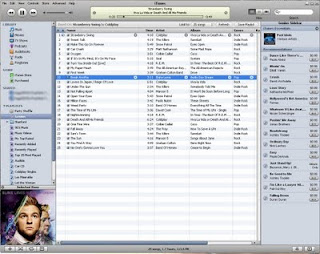
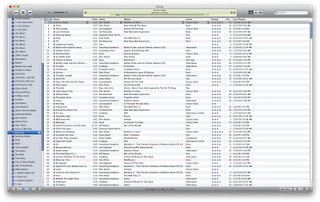
First, I don't care for the new play and forward/rewind buttons. In fact, the entire top of the app looks more plastic-y than before. It also seems as though the interface has taken a step backward in terms of the contrast of such things as the volume slider and the track playing indicator window. There's too much contrast now, making it difficult to look at. I really, really liked the contrast of iTunes 8. See here:

Before (iTunes 8)

After (iTunes 9)

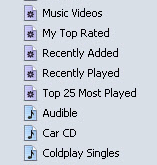
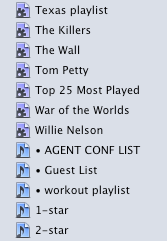
There are also new icons in the sidebar. The new huge, dark gear on the smart playlist icon is hard on my eyes, especially when presented with dozens of other smart playlists, as I have in my iTunes library. The colors are now also darker and harder to differentiate at a glance, such as when you're scrolling through a huge list of playlists (which I do regularly.)

Before:

After:

And finally, but certainly not least - Apple has changed the functionality of the green button (Mac only) in the top left corner. Previously, clicking it would collapse the main window down to the mini player, which is how I keep it when I'm working. But in iTunes 9, to get the mini player, you now either have to option-click or shift-command-m.

This is cumbersome to me because there are a lot of times when I'll maximize my window with a click to check out a track or to see either what just played or what's next. Then I'd just click the green button again to send it back to the mini player. Now I have to involve my left hand to make the move. When I'm reading an article on the web or designing, most times I'm sitting back with only my right mouse hand engaged. I guess I could just click up to the menu bar and select the menu option, but I also hate using the menu bar if I don't have to.

And this new change in functionality isn't implemented very well. The first time I tried to collapse to the mini-player, clicking the green button just made the iTunes window jump around the screen. I actually had to go out to the web and search around for awhile before I found out that I now had to option-click.

Also, it took me way too long to figure out how to engage the wish list feature on the store. Previously, I used the shopping cart as a repository for songs that I plan to purchase someday. The new version does away with the shopping cart altogether and adds a wish list. I assumed that the wish list would be listed at the top of the store window under Quick Links, along with Redeem and Account. No such luck. There's also no way to access it under the Store menu in the menu bar. It turns out that the wish list is down at the very bottom of the store page under "manage." This seems like a very strange place to hide a repository list of items that you're planning on spending money on someday. It really should be at the top of the window, and it should probably even have a place in the sidebar with the store icon.

On a more positive note, the Home Sharing feature is going to be very welcome in my house. Our main iTunes library is on my computer in the office, and Kristi has some stuff on her laptop that she likes. but it's really a chore keeping it updated. We bought some music for her a couple of weeks ago, and it still hasn't made it onto her laptop because it required moving the actual files around in the finder and importing them into her iTunes library. I'm looking forward to her being able to pick exactly what she wants out of the main library and copy it to her Mac herself. She'll be happier with the results that way.

Genius mixes looks cool. It's the kind of thing I can see myself turning on on a Saturday and streaming through the house. I just wish it were a little more customizable, as in letting you pick which genres you wanted to create genius mixes from. The genius created five rock mixes, three alternative, one praise and worship, one easy listening and two country mixes. I know I have a wider selection of music than that. It would also be nice if you could see the songs that the playlist contained. But alas, I supposed that's what a regular genius list is for. It also seems weird that you can't rate - or change the rating - on a song when it's playing from a genius mix.

I supposed I'll get used to all these things, but my initial impression is that this release doesn't feel like an Apple product in its current state. Rather, it feels like an imitation based on iTunes.

Thursday, August 27, 2009

Snow Leopard Compatibility Chart

Excellent list of apps that work and fail under Snow Leopard.

Looks like my Photoshop CS2 and Dreamweaver MX are going to be problems.